> ## Documentation Index
> Fetch the complete documentation index at: https://hoopdev-docs-control-plane-owns-listeners.mintlify.site/llms.txt
> Use this file to discover all available pages before exploring further.
# License Management
> Managing License for your Hoop Installation
Hoop includes the Open Source license by default. If you're evaluating or using enterprise features,
this guide will help you manage your license in your current installation.
Two components read a license, from different places. The **gateway** keeps it in its database, installed through the web application or `hoop admin license install`. The **Sidecar** has no database, so it takes the same document on the command line, in the environment, or in its config file. One license Hoop issues verifies for both. Jump to [Licensing the Sidecar](#licensing-the-sidecar) if that is the component you are configuring.
## License Characteristics
* A single license can be applied to multiple hosts
* All licenses have an expiration date
* The gateway stops functioning when your license expires
* The Sidecar keeps serving on an expired license, under its free-tier rule caps
## Managing Gateway Licenses Through the Web Application
The web application allows you to upload a new license or update an expired one.
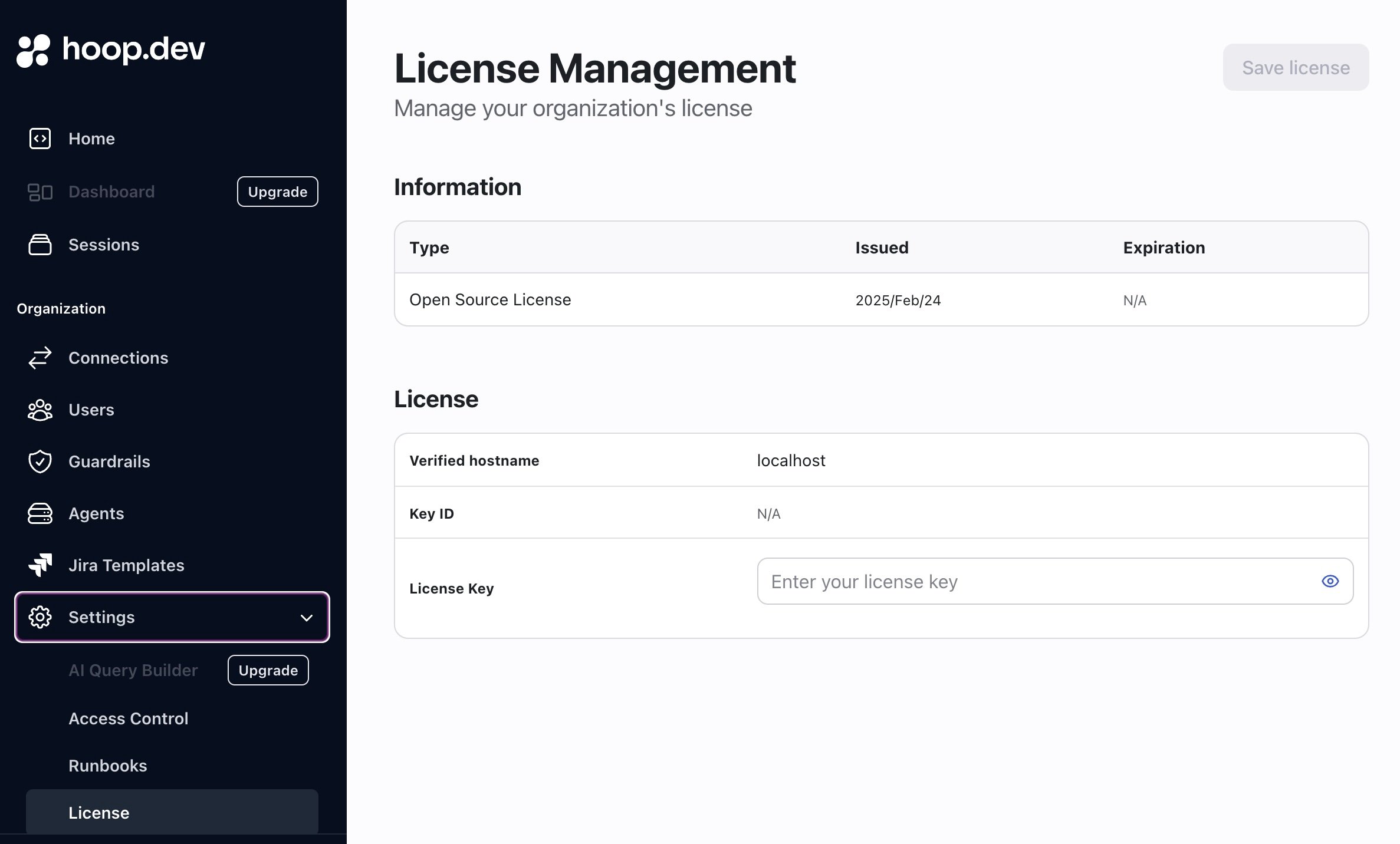 The web application only permits license updates after expiration.
To update an active license before it expires, use the command line utility instead.
## Managing Gateway Licenses Through the Command Line
The command line interface provides more flexibility, including the ability to update licenses before expiration:
```sh theme={null}
hoop admin license install --file /path/to/license.json
```
### License Information
To obtain license information of you current installation
```sh theme={null}
hoop admin serverinfo
(...)
License:
Key ID: 743420a...79bc
Type: enterprise
Valid: true
Issued At: 2024-07-08T09:58:43Z
Expires At: 2044-07-08T10:58:43Z
Allowed Hosts: [*.hoop.dev]
Verify Error:
```
## Handling Expired Gateway Licenses
When a gateway license expires, all execution attempts will fail with an error. You have two options:
1. Update to a new enterprise license
2. Downgrade to the Open Source license
Contact [our support team](https://help.hoop.dev) if your license is nearing expiration.
### Downgrading to Open Source
To downgrade your installation, update the license with the Open Source version:
```
curl -L https://releases.hoop.dev/default-oss-license.json > /tmp/hoop-oss-license.json
hoop admin license install --file /tmp/hoop-oss-license.json
```
Advanced users can also remove license information by clearing the `license_data` column in the `private.orgs` database table.
***
## Licensing the Sidecar
The Sidecar is a standalone process that reads its whole configuration from one file, so `hoop admin license install` does not reach it. Hand it the license directly.
### Three sources, one order
| Precedence | Source | Spelling |
| ---------- | ------------ | --------------------------------------------------------------------------------------- |
| 1 | Command line | `hoop start sidecar --license …`, or `hoop-inspect -license …` on the standalone binary |
| 2 | Environment | `HOOP_LICENSE` |
| 3 | Config file | the top-level `license` key |
The flag outranks the environment variable, which outranks the config key. Licensing a fleet is then one environment variable rather than an edit to every config file in it, and one host can still override the fleet from its command line.
**The first source holding a value decides, valid or not.** A `HOOP_LICENSE` pointing at a file that does not exist is an error, not a reason to fall back to the `license` key. Falling through would hide a broken environment variable until the next config change made it matter.
`HOOP_LICENSE` is deliberately not `HOOP_SIDECAR_LICENSE`. The document is the same one the gateway verifies, and a deployment spelling it two ways sets one of them wrong.
### A path or the document itself
Every source accepts both shapes. A value whose first non-blank character is `{` is read as the license document; anything else is read as a filename. Moving a license from a mounted file to a secret is then not also a rename.
```sh theme={null}
# A path, for a mounted file
hoop start sidecar --config config.yaml --license /etc/hoop-inspect/license.json
# The document itself, for a secret injected as an environment variable
HOOP_LICENSE="$(cat license.json)" hoop start sidecar --config config.yaml
```
```yaml config.yaml theme={null}
license: /etc/hoop-inspect/license.json
```
```yaml config.yaml theme={null}
license: '{"payload":{"type":"enterprise","description":"Acme Corp",...},"key_id":"743420a…","signature":"…"}'
```
### What the Sidecar does without one
An unlicensed process enforces one guardrail rule and one data masking rule, per process rather than per lane. A license lifts the cap for each feature it names, `guardrails` and `data-masking` being the two the Sidecar reads.
Check what a process resolved before you deploy it:
```sh theme={null}
hoop start sidecar --config config.yaml --validate
```
```
config OK: 1 listener(s)
license: valid. enterprise "Acme Corp", expires 2027-01-30, features: all (from HOOP_LICENSE)
limits: unlimited guardrail rule(s), unlimited data masking rule(s)
appdb postgres enforcing 3 rule(s) + masking
```
A running process reports the same verdict at `GET /config` on its admin listener, under `license` and `limits`, minus the signature.
### Expiry on the Sidecar
A missing or expired license is a state, not a startup failure. A license that cannot be **read** is a failure: a path to nothing, malformed JSON, or a signature that does not verify stops startup and names the source it came from, because dropping to the free tier over a typo would be a silent downgrade.
Once a term ends under a running relay, what happens depends on the config. One inside the free-tier caps keeps serving and reports `expired`. One over them drains its connections, flushes its audit trail and exits non-zero, and startup refuses the config by name until somebody renews or removes rules. The log warns once a day through the last fortnight of the term.
Full reference: [Config File Reference — Licensing](/setup/configuration/hoop-sidecar/config-file#licensing).
The web application only permits license updates after expiration.
To update an active license before it expires, use the command line utility instead.
## Managing Gateway Licenses Through the Command Line
The command line interface provides more flexibility, including the ability to update licenses before expiration:
```sh theme={null}
hoop admin license install --file /path/to/license.json
```
### License Information
To obtain license information of you current installation
```sh theme={null}
hoop admin serverinfo
(...)
License:
Key ID: 743420a...79bc
Type: enterprise
Valid: true
Issued At: 2024-07-08T09:58:43Z
Expires At: 2044-07-08T10:58:43Z
Allowed Hosts: [*.hoop.dev]
Verify Error:
```
## Handling Expired Gateway Licenses
When a gateway license expires, all execution attempts will fail with an error. You have two options:
1. Update to a new enterprise license
2. Downgrade to the Open Source license
Contact [our support team](https://help.hoop.dev) if your license is nearing expiration.
### Downgrading to Open Source
To downgrade your installation, update the license with the Open Source version:
```
curl -L https://releases.hoop.dev/default-oss-license.json > /tmp/hoop-oss-license.json
hoop admin license install --file /tmp/hoop-oss-license.json
```
Advanced users can also remove license information by clearing the `license_data` column in the `private.orgs` database table.
***
## Licensing the Sidecar
The Sidecar is a standalone process that reads its whole configuration from one file, so `hoop admin license install` does not reach it. Hand it the license directly.
### Three sources, one order
| Precedence | Source | Spelling |
| ---------- | ------------ | --------------------------------------------------------------------------------------- |
| 1 | Command line | `hoop start sidecar --license …`, or `hoop-inspect -license …` on the standalone binary |
| 2 | Environment | `HOOP_LICENSE` |
| 3 | Config file | the top-level `license` key |
The flag outranks the environment variable, which outranks the config key. Licensing a fleet is then one environment variable rather than an edit to every config file in it, and one host can still override the fleet from its command line.
**The first source holding a value decides, valid or not.** A `HOOP_LICENSE` pointing at a file that does not exist is an error, not a reason to fall back to the `license` key. Falling through would hide a broken environment variable until the next config change made it matter.
`HOOP_LICENSE` is deliberately not `HOOP_SIDECAR_LICENSE`. The document is the same one the gateway verifies, and a deployment spelling it two ways sets one of them wrong.
### A path or the document itself
Every source accepts both shapes. A value whose first non-blank character is `{` is read as the license document; anything else is read as a filename. Moving a license from a mounted file to a secret is then not also a rename.
```sh theme={null}
# A path, for a mounted file
hoop start sidecar --config config.yaml --license /etc/hoop-inspect/license.json
# The document itself, for a secret injected as an environment variable
HOOP_LICENSE="$(cat license.json)" hoop start sidecar --config config.yaml
```
```yaml config.yaml theme={null}
license: /etc/hoop-inspect/license.json
```
```yaml config.yaml theme={null}
license: '{"payload":{"type":"enterprise","description":"Acme Corp",...},"key_id":"743420a…","signature":"…"}'
```
### What the Sidecar does without one
An unlicensed process enforces one guardrail rule and one data masking rule, per process rather than per lane. A license lifts the cap for each feature it names, `guardrails` and `data-masking` being the two the Sidecar reads.
Check what a process resolved before you deploy it:
```sh theme={null}
hoop start sidecar --config config.yaml --validate
```
```
config OK: 1 listener(s)
license: valid. enterprise "Acme Corp", expires 2027-01-30, features: all (from HOOP_LICENSE)
limits: unlimited guardrail rule(s), unlimited data masking rule(s)
appdb postgres enforcing 3 rule(s) + masking
```
A running process reports the same verdict at `GET /config` on its admin listener, under `license` and `limits`, minus the signature.
### Expiry on the Sidecar
A missing or expired license is a state, not a startup failure. A license that cannot be **read** is a failure: a path to nothing, malformed JSON, or a signature that does not verify stops startup and names the source it came from, because dropping to the free tier over a typo would be a silent downgrade.
Once a term ends under a running relay, what happens depends on the config. One inside the free-tier caps keeps serving and reports `expired`. One over them drains its connections, flushes its audit trail and exits non-zero, and startup refuses the config by name until somebody renews or removes rules. The log warns once a day through the last fortnight of the term.
Full reference: [Config File Reference — Licensing](/setup/configuration/hoop-sidecar/config-file#licensing).